DVB Inspector
Digitalekabeltelevisie.nl
Installation
You need to have java 21 installed to be able to run DVB Inspector.
DVB inspector comes in a single .zip file. It contains all necessary files for running DVB inspector.
Unzip DVBinspector-1.21.0-dist.zip to a directory of your choice. It will create the following directory structure;
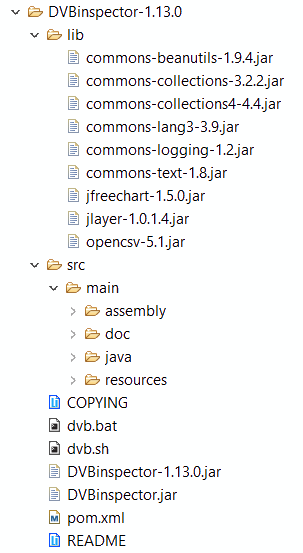
- lib directory, contains external libraries that are required.
- src/main/java, this directory contains sources for the java program.
- src/main/resources, contains images needed by DVB Inspector
- src/main/resources/res, contains comma separated resource files for bouquet_id, ca_system_id, data_broadcast_id, original_network, platform_id, oui_registration. The files can be updated if needed, see below.
- COPYING, contains the GPL license
- dvb.bat Dos command script that starts the program. Can be modified if libraries are placed in a different location than default.
- dvb.sh Bash script to start the program using Linux.
- DVBInspector.jar contains the classes for the main program. Can be executed using the dvb.bat or dvb.sh script.
- DVBinspector-1.21.0.jar. Self contained jar that contains all resources and libs. To execute just double click.
DVBinspector-1.21.0.jar
Starting from release 0.0.3 there are now two ways to start
DVBInspector. The easiest is to use DVBinspector-1.21.0.jar. This
jar contains everything DVBInspector needs (apart from java), so
there is no need to set class-paths, etc. On windows just double-c lick.
Or from command line type "DVBinspector-1.21.0.jar" (without the
quotes). If you want more control (to set heap size), and see some debug information
you can use "java -jar DVBinspector-1.21.0.jar".
DVB.bat
This small windows batch file sets up the environment to start DVB Inspector. It includes the needed libraries in the class path.
Default it does NOT set a HEAP size, but you can change the JVM_FLAGS variable to set a value appropriate for your system. -Xmx1000m sets the maximum memory heap size to 1 GB. This should be enough to read fairly large TS files (> 200 MB). When you have more memory you could use 4GB, this will speed up processing.
java -classpath .;.\lib\jfreechart-1.0.19.jar;.\lib\jcommon-1.0.23.jar;.\lib\opencsv-2.1.jar;.\lib\jlayer-1.0.1-1.jar;.\DVBinspector.jar -Djava.util.logging.config.file=src/main/resources/logging.properties nl.digitalekabeltelevisie.main.DVBinspector
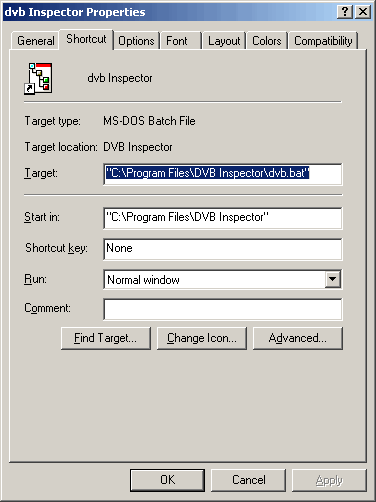 When using Windows you can create a shortcut to dvb.bat on your desktop, or in the
quick launch bar.
When using Windows you can create a shortcut to dvb.bat on your desktop, or in the
quick launch bar.
DVB.sh
The dvb.sh file is the linux version of the dvb.bat file. However it does not explicitly set the memory heap size. This content of this file should be correct, but you may need to change file permissions;
java -verbose -classpath .:./lib/jfreechart-1.0.19.jar:./lib/jcommon-1.0.23.jar:./lib/opencsv-2.1.jar:./lib/jlayer-1.0.1-1.jar:./DVBinspector.jar -Djava.util.logging.config.file=src/main/resources/logging.properties nl.digitalekabeltelevisie.main.DVBinspector
Resources
DVB Inspector comes with a full set of resource files. These are used for looking up identifiers, like network_id. However, if you want to update them, or modify them here are some pointers;
From http://www.dvbservices.com/ you can down load .xsl files with the most up to date DVB identifiers. To convert these to .csv files which DVB Inspector can use you need Open Office;
Open the .csv file in Open Office. To remove the top lines with heading information select delete entire row. Save as... Select .csv File Select UTF-8 as encoding, , as separator and " as Text delimiter.
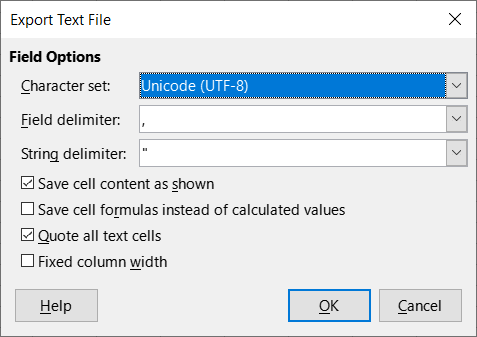
Your file will be saved as UTF-8, which is the encoding DVB Inspector needs.
File format
In general, the format of the look up files is this: comma separated file (field separator ',' (0x2C), string delimiter '"'(0x22)), encoding UTF-16 LE, three significant columns. First column indicates the start of the range for this identifier, second column the end, third colum contains the description to be used in DVB Inspector. All other columns are ignored.
Values in the first and second column are to be surrounded with '"' (0x22), and may be in any notation java can parse (hexadecimal 0x32, decimal 50 or octal 062).
Example
 "0x0090","0x0090","Eutelsat
					1","Eutelsat",905,"Europe","2009-03-03" "0x0091","0x0091","Eutelsat
					2","Eutelsat",905,"Europe","2009-03-03"
					"0x0100","0x011F","BBC","BBC",902,"All countries","2009-08-19"
This is a part of the bouquet_id file. For value 0x0090 (144 decimal) "Eutelsat 1" is shown, for value 0x0091 (145 decimal) "Eutelsat 2" is shown and the values 0x0100 up to 0x011f (256 - 287) map to "BBC".
This page was last modified on 3/10/2025